
Account Settings – PayPal and Stripe
Learn how to configure your Account Settings so you can receive payments securely through PayPal and Stripe on BuySellBid.
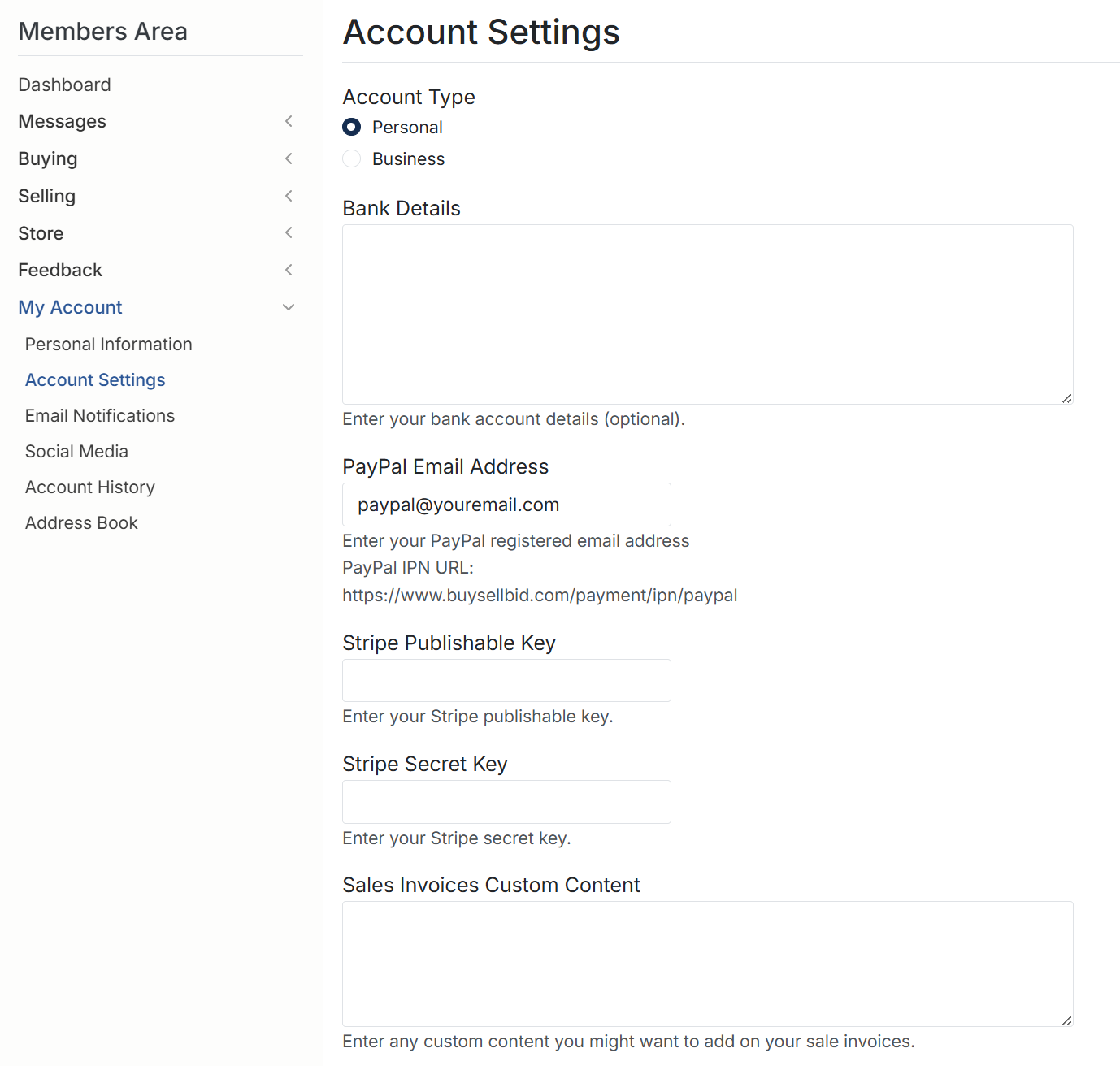
1. Accessing Account Settings
- Sign in to your BuySellBid account.
- In the left menu, click My Account.
- Select Account Settings.
On this page you can choose your account type, add bank details, connect PayPal and Stripe, and customize the content shown on your sales invoices.
2. Choosing Your Account Type
You can set your account as either Personal or Business:
- Personal – best if you are selling as an individual or on a small scale.
- Business – use this if you are a company, registered business, or selling under a business/trading name.
When you choose Business, an Additional Information section appears where you can enter your company’s name and optional bank details. Make sure the information you enter matches the details on your PayPal and Stripe accounts.
3. Additional Information (Business Accounts)
If your account type is set to Business, you will see:
- Company Name – enter your registered business or trading name exactly as you want it to appear on invoices and payment records.
- Bank Details (optional) – add any bank transfer information you wish to share with buyers, such as account name, number/IBAN, branch, or routing details.
Only include the information you are comfortable displaying to buyers. Never enter online banking passwords or secure login details here.
4. Bank Details (Personal or Business)
The Bank Details field is optional for all accounts. You can use it to show bank transfer information on your invoices, for example:
- Bank or credit union name
- Account name
- Account number or IBAN
- Branch, routing, or transit numbers
- Any special reference or payment instructions
This information may appear on your sales invoices depending on your invoice template. Do not include sensitive security information in this box.
5. PayPal Email Address
To receive payments via PayPal:
- In the PayPal Email Address field, enter the email address registered to your PayPal account.
- Double-check for spelling errors.
- Save your Account Settings.
You may also see the PayPal IPN (Instant Payment Notification) URL:
https://www.buysellbid.com/payment/ipn/paypal
This URL allows BuySellBid to confirm PayPal payments automatically. In most cases it is configured for you. Only advanced users need to copy it into their PayPal account’s IPN settings.
6. Stripe Settings (Credit Card Payments)
Stripe lets you accept credit and debit card payments. To connect Stripe, you need two API keys from your Stripe dashboard:
- Stripe Publishable Key
- Stripe Secret Key
Important: Treat your Stripe Secret Key like a password.
Never share it publicly or send it by email or chat.
To set up Stripe:
- Log in to your Stripe account.
- Go to the Developers or API section.
- Copy your Publishable Key and paste it into the Stripe Publishable Key field on BuySellBid.
- Copy your Secret Key and paste it into the Stripe Secret Key field.
- Save your Account Settings.
After saving, BuySellBid can use Stripe to process card payments for your listings, depending on the site’s payment configuration. If payments fail or you change Stripe accounts, update your keys in this section.
7. Sales Invoices Custom Content
The Sales Invoices Custom Content box allows you to add extra text that appears on your sale invoices. You can use it for:
- A short thank-you message for buyers
- Payment instructions or bank transfer notes
- Shipping, handling, or processing information
- Your business contact details or tax number
- A brief summary of your terms, conditions, or refund policy
Keep this content clear and professional, and avoid including any sensitive personal information.
8. Saving Your Changes
- Review all your details to make sure they are correct.
- Scroll to the bottom of the page and click the button to save your settings.
- If you change your PayPal email or Stripe keys, consider testing a small transaction to confirm payments are working.
9. Security Tips
- Only enter payment details on the official BuySellBid.com site.
- Never share your Stripe Secret Key or PayPal password with anyone.
- Update your settings if you change banks, PayPal accounts, or Stripe keys.
- Monitor your sales invoices and account history regularly.
If you have questions or if payments do not appear as expected, contact BuySellBid support and provide your order number, date, and payment method so we can help you quickly.