
Bidding on BuySellBid
Bidding on BuySellBid lets you compete for items in real time and win them at a fair market price. This guide explains how to read an auction page, place a bid, use maximum (proxy) bidding, and keep track of your current bids as a buyer.
1. Before You Place a Bid
To bid on any auction you must be signed into your BuySellBid account and your account must be in good standing. Make sure your contact details, shipping address, and preferred payment methods are up to date in your Members Area > My Account. Always read the full listing description, shipping costs, payment terms, and seller feedback before you bid – bidding is a commitment to buy if you win.
2. Understanding the Auction Page
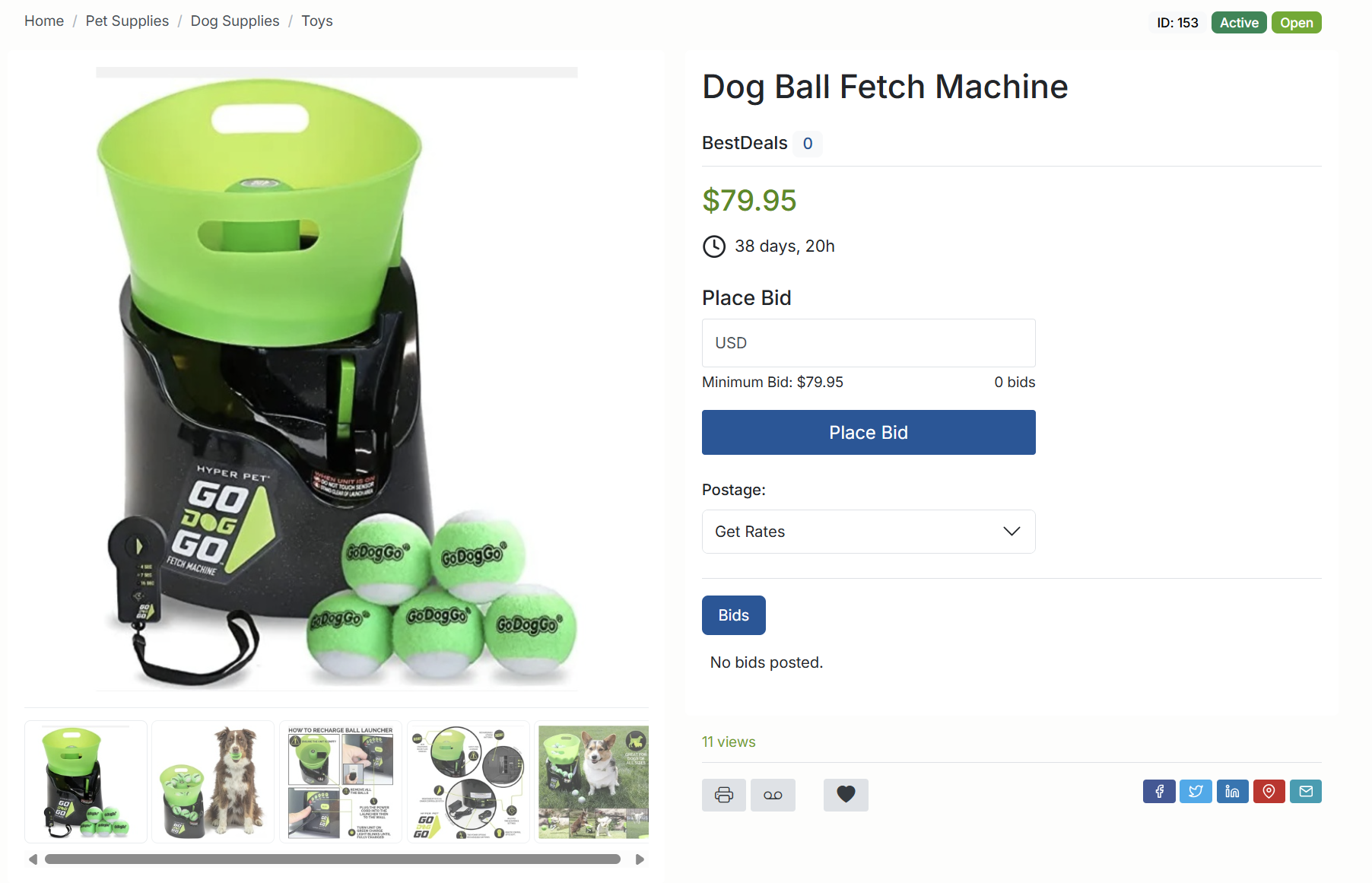
Each auction page shows key information to help you decide how much to bid:
- Current Bid – the highest bid placed so far.
- Number of Bids – how many bids have been placed on the item.
- Minimum Next Bid – the lowest amount you can bid next based on the bid increment.
- Reserve Status – if the seller set a reserve price, you’ll see whether it has been met or not. :contentReference[oaicite:0]{index=0}
- Time Left – the countdown to the auction end time.
- Shipping & Payment – how the item will be shipped and which payment methods are accepted.
3. Placing a Standard Bid
- Go to the auction page for the item you want.
- Enter your bid amount in the bid box (at or above the minimum next bid).
- Click the button to continue to the confirmation screen.
- Review the bid amount, shipping cost, and total. If everything looks correct, confirm your bid.
After you confirm, the site will show a message telling you whether you are currently the highest bidder or if your bid was too low.
4. Using Maximum (Proxy) Bidding
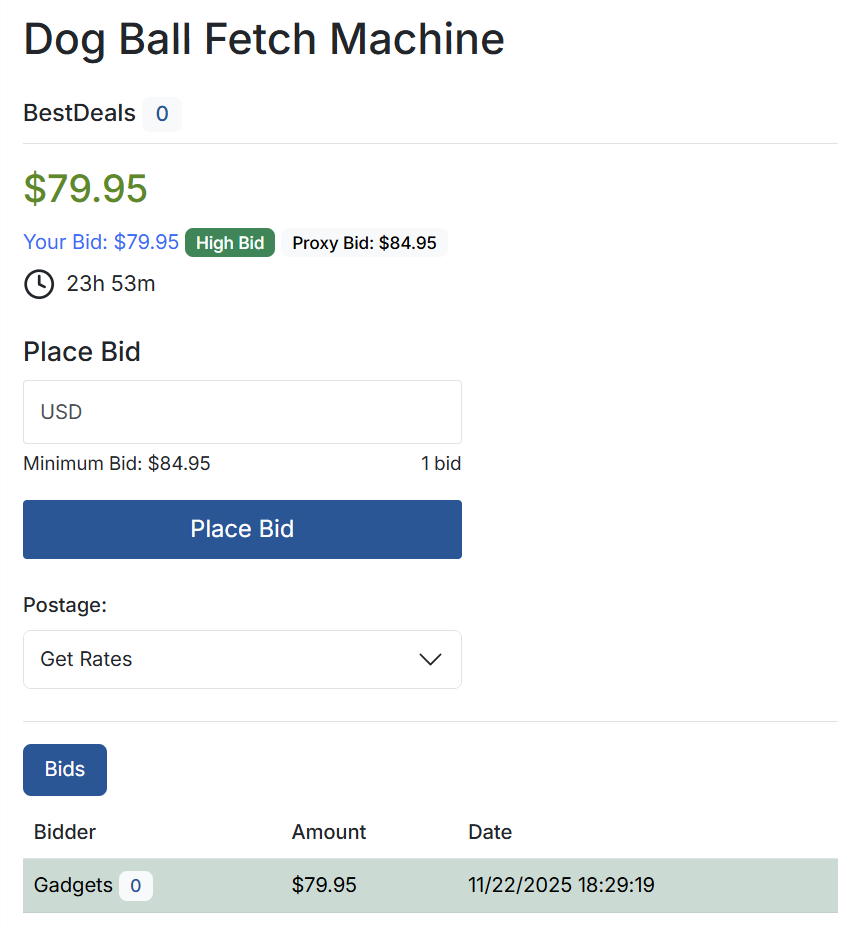
BuySellBid supports maximum (also called proxy) bidding. Instead of manually raising your bid every time someone else bids, you can enter the highest amount you’re willing to pay. The system will then automatically increase your bid in small steps only when needed to keep you ahead of other bidders.
Example:
- You place a maximum bid of $50 on an item where the current bid is $20.
- Another buyer bids $30. The system automatically raises your bid just enough to beat them (for example, to $31), not all the way to $50.
- Your true maximum of $50 is never shown to other bidders. If someone else bids above your maximum, you’ll be outbid.
Proxy bidding helps you stay competitive without constantly watching the auction. It also ensures you pay the lowest possible winning price, not automatically your full maximum.
5. Reserve Prices
Some auctions have a Reserve Price, which is the minimum amount the seller is willing to accept. If the highest bid is below the reserve, the item will not be sold even if the auction timer reaches zero. The auction will continue until a bid meets or exceeds the reserve price.
6. Bid Confirmations and Outbid Alerts
Every time you place a bid you’ll see a confirmation screen and a message telling you whether you are currently the high bidder. If another buyer outbids you, the system sends an email notification to the address on your account so you can decide whether to bid again.
7. Viewing and Managing Your Current Bids
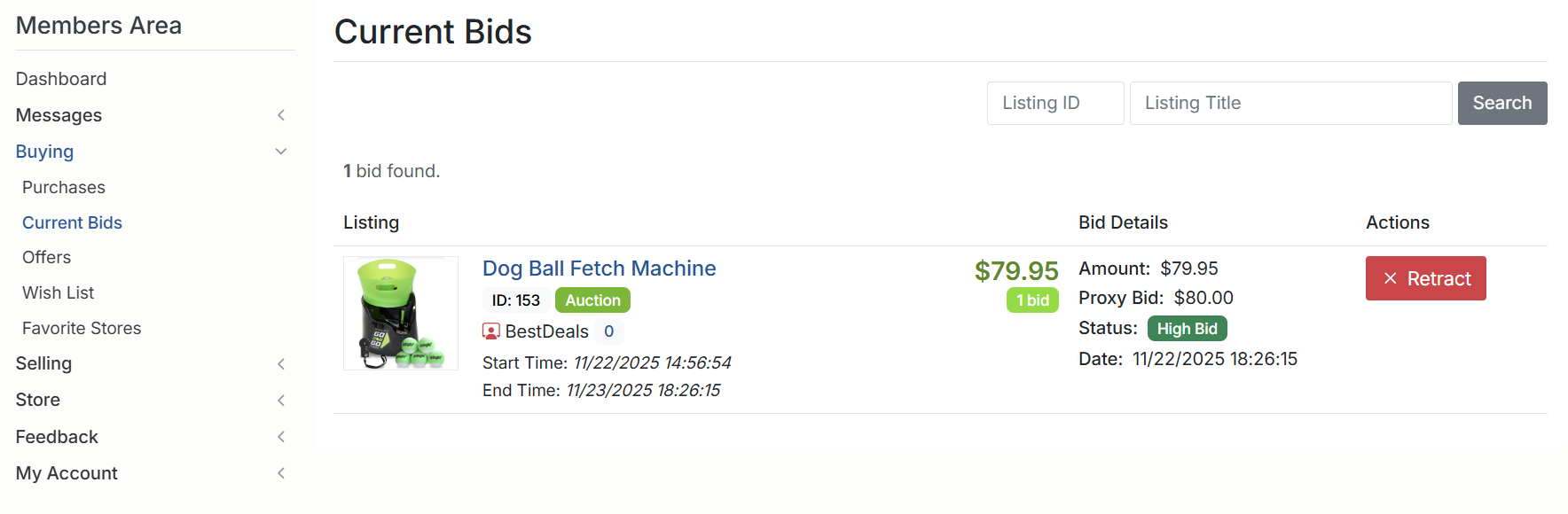
You can review and manage all of your active bids from the Members Area > Buying > Current Bids section. This page shows each auction you’re bidding on, your current bid, whether you’re winning or outbid, and the time left on each item. From here you can click through to any listing to raise your bid or check the latest activity.
8. Retracting a Bid
One condition must be satisfied for a bid retraction. Only the user with the highest bid can do it. The platform ensures that each bidder has the opportunity to decide whether to continue or to get out once he or she becomes the highest bidder.
9. If You Win an Auction
When you win, the listing will move to your Members Area > Buying section (for example, under Won Items or similar, depending on the site configuration). There you can view the seller’s payment instructions, pay any invoice, and track the status of your order until it is shipped and completed.
10. Tips for Successful Bidding
- Decide your maximum price in advance and stick to it.
- Use proxy bidding to avoid emotional “bidding wars.”
- Check shipping costs and delivery times before bidding.
- Review the seller’s feedback and terms carefully.
- Place your bids a little early so you have time to react if you’re outbid.
With these steps, you’ll be ready to bid confidently on BuySellBid and make the most of every auction.