
Changing Your Password
Your BuySellBid password is the key to your account, your listings, and your purchases. We recommend using a strong, unique password and updating it regularly, especially if you sign in from public or shared devices.
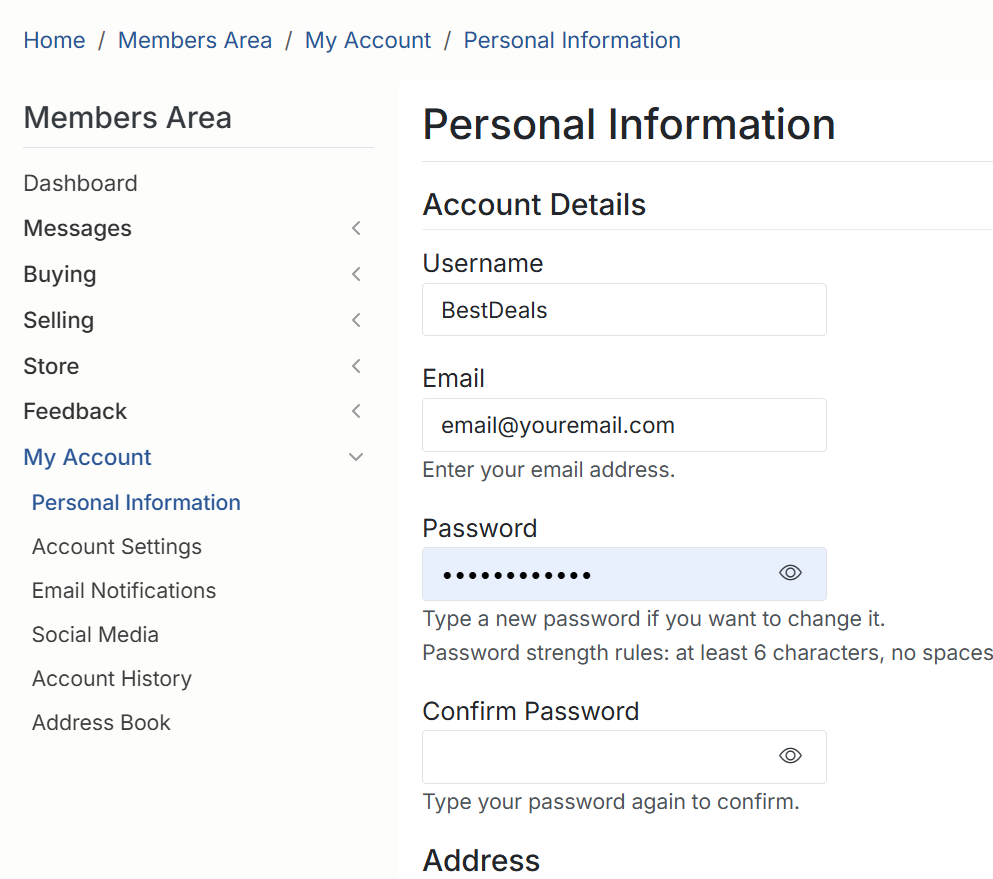
How to change your password
Follow these steps to update your password:
- Sign in to your BuySellBid account.
- Click My Account at the top of the page.
- In the left menu, select Personal Information.
- Scroll to the Password section.
- In the Password field, type your new password.
- In the Confirm Password field, type the same password again.
- Review your changes and click the button to save/update your personal information.
Password rules and tips
For best security, we recommend that your password:
- Is at least 6 characters long (longer is better).
- Includes a mix of upper and lower case letters, numbers, and symbols.
- Does not use obvious words like your name, username, or “password”.
- Is unique to BuySellBid and not reused from other sites.
If the site tells you the password is too weak or does not meet the rules shown on screen, try adding more characters or mixing in numbers and symbols until the warning disappears.
If you forgot your password
If you can’t sign in to change your password:
- Go to the Sign In page.
- Click forgot password.
- Enter the email address linked to your account and follow the instructions in the email we send.
For your safety, never share your password with anyone. BuySellBid staff will never ask you for your password by email, message, or phone.