
Managing Your Account
Your BuySellBid account dashboard is the control center for everything you do on the site. From here you can review your activity, update your details, manage your store, and keep your account secure.
Accessing Your Dashboard
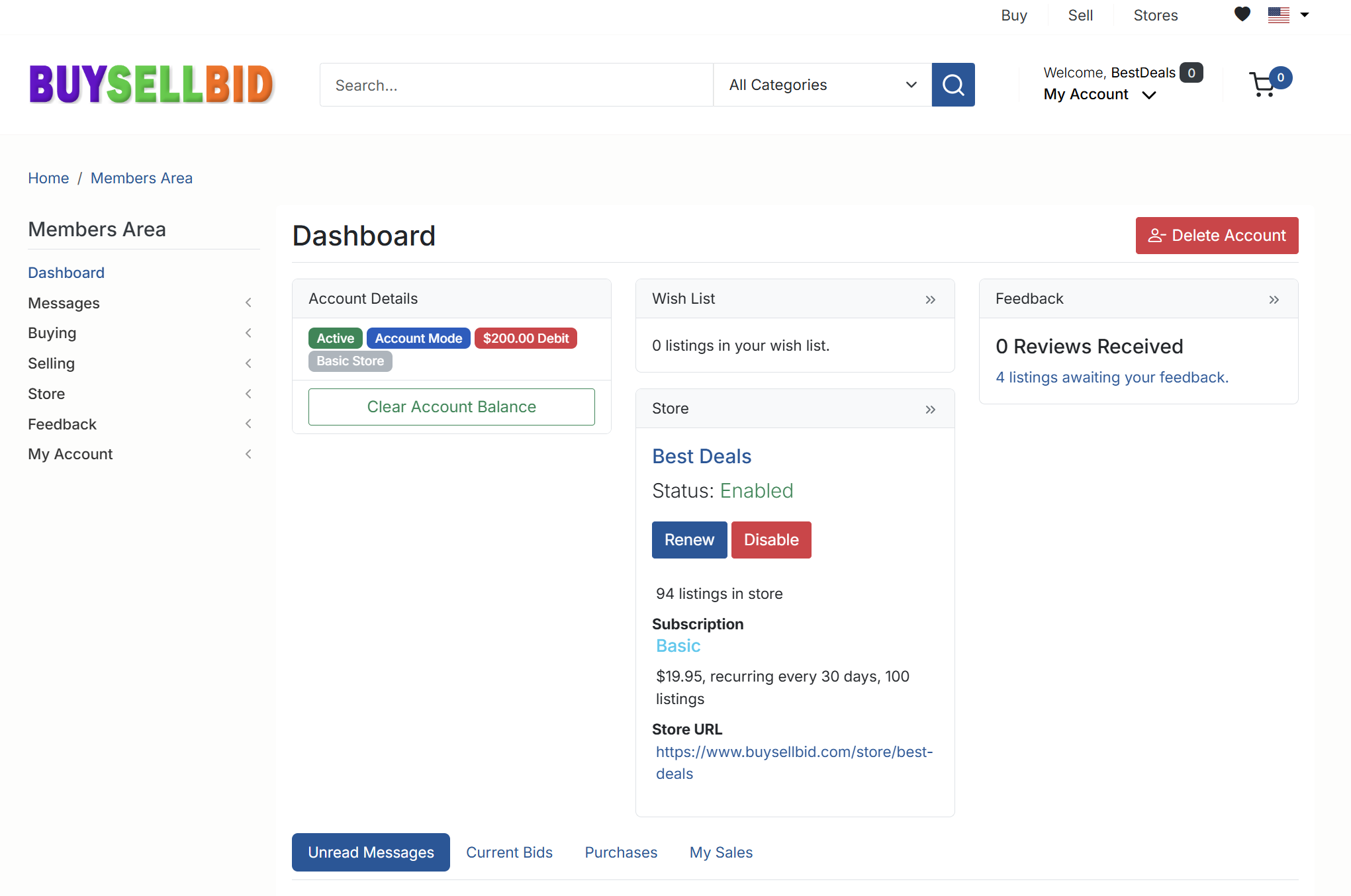
After signing in, click My Account in the top-right corner and choose Members Area. The dashboard shows:
- Account Details – account status and mode.
- Credit Account – current balance and currency.
- Wish List – items you’re watching.
- Store – status of your seller store (if enabled).
- Feedback – summary of reviews you’ve received.
Updating Your Profile
Use the My Account section in the left menu to update your profile details. You can change your display name, contact information and other profile fields that other members see when they interact with you.
Always make sure your email address is correct so you receive order updates, messages and important account notifications.
Changing Your Password
To change your password, go to My Account and look for the password or security settings. Enter your current password, then choose a strong new one. For best security, use a unique password that includes letters, numbers and symbols.
Managing Notifications
In the same area you can adjust your notification and email settings. Choose which emails you want to receive for bids, purchases, messages, store activity and site announcements. If you stop receiving emails, double-check your address and spam/junk folder.
Using Your Credit Account
The Credit Account panel on the dashboard shows your available balance. Select your currency, then click Proceed to add funds or review your credit history. Your credit account is used for site fees and other charges.
Store and Selling Settings
If you have a seller store, the Store panel on the dashboard shows your store name, status and subscription information. Use the Store menu to edit store details, manage subscriptions and customize how your listings appear to buyers.
Viewing and Responding to Feedback
The Feedback section summarizes the reviews you’ve received. Click through to respond to feedback, manage comments, and review any listings awaiting your feedback.
Closing or Deleting Your Account
If you decide to stop using BuySellBid, you can request to close your account from the dashboard. Use the Delete Account option and follow the prompts. Make sure you have no open listings, unpaid fees or unresolved disputes before you proceed.
Keeping Your Account Secure
- Never share your password or login link.
- Sign out on shared or public devices.
- Update your password regularly.
- Report any suspicious messages immediately.
By checking your dashboard regularly and keeping your information up to date, you’ll get the most out of BuySellBid and maintain a secure, trusted account.